Windows 10 & 11 · 64-bit
Download BakoshApp for Windows
Free to download and free to use. Install it on the PC you stream from, sign in with Google, and your viewers can play in minutes.
After you download
From installer to live in three steps
- 01
Run the installer
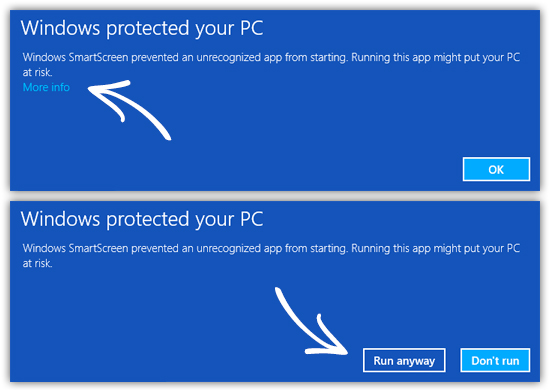
Open BakoshAppInstall.exe. The installer isn't code-signed yet, so Windows may show a SmartScreen warning: click More info, then Run anyway.
- 02
Sign in with Google
The app opens your browser. Your Bakosh account is created on the first sign-in — the free plan needs no card.
- 03
Pick a game, go live
Install a mod in one click, connect TikTok or Kick, and start your LIVE. A quick-start preset is ready to go.
System requirements
- Windows 10 or 11, 64-bit
- The game you stream: GTA V, RDR2, Rust, Minecraft or TABS
- A TikTok account with LIVE access, or a Kick channel
- OBS or TikTok LIVE Studio for overlays (optional)